Your shopping cart is empty.
Cart
Login
Register
Forgot Password
Konumunuza özel içerikleri görmek ve online alışveriş yapmak için başka bir ülkeyi veya bölgeyi seçin.

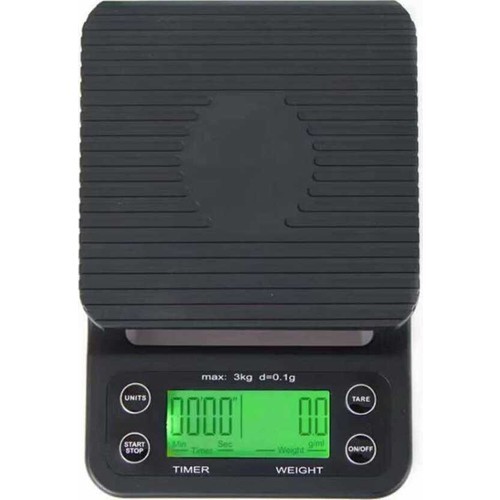

Precision Coffee Scale – Product Description & User Guide (English)
The scale measures the weight of coffee beans, the amount of hot water, and the brewing time simultaneously. These measurements are the core components of preparing filter coffee. It can also be used for food preparation in the kitchen.
Display Screen
Open the battery compartment at the bottom and insert two AAA batteries. Place the scale on a firm and flat surface.
The screen will display Figure 1 for 2 seconds, then automatically switch to Figure 2.
Figure 2 indicates the ready-to-use mode.
A: Weight indicator
B: Time indicator
C: Low battery indicator
Button Functions
ON/OFF
Turns the device on and off.
MODE
Press to change the measurement unit.
Press and hold for 3 seconds to activate the countdown mode.
START/STOP
When in countdown or timer mode, press once to start timing.
Press again to pause.
Press once more to resume from where it stopped.
Press and hold for 3 seconds to reset the timer to zero.
TARE
Press once to tare (zero) the scale.
Press and hold to disable the automatic shut-off function.
Unit Conversion
This product supports four different units: oz, lb, g/ml, and ml.
Each press of the MODE button switches the unit.
ml and g/ml indicate the amount of water
M1 indicates the milk ratio
Operating Instructions
Open the battery compartment and insert two AAA batteries.
Place the device on a stable, flat surface.
After proper placement, Figure 1 will appear on the screen.
After 2 seconds, the display will switch to Figure 2.
When Figure 2 appears, the device is ready for use. Select the appropriate measurement mode as needed.
Quick Instructions / Prompt Messages
O-Ld: Overload (excess weight)
LO: Low battery
A-OFF: Automatic shut-off disabled
UNST: Unstable surface or vibration detected
Benzer Ürünler